Interface Overview#

The FlexiVision One interface is organized into functional sections that guide the user from initial configuration to day-to-day system operation. Each page provides real-time information about machine status, connections, performance, and process parameters, with direct access to the main functions. Navigation is designed to ensure ease of use, immediate control of operations, and continuous monitoring of vision, feeding, and robot performance.

Home page#

../../_images/pagina_homeW.png ../../_images/pagina_homeB.png
Home Page Description#

#

Description

1

Status and user information:

  • Current selected recipe: shows the name of the recipe currently loaded and ready for use.

  • Current user name: shows the logged-in user and the related access level.

  • In run: indicates the operating state and whether the system is currently running or stopped.

2

Software and support information:

  • Version software: indicates the currently installed FlexiVision One software version.

  • Contact us: button that provides quick access to support and service contact information.

3

Resources and quick guides:

  • Documentation: button that opens the complete library of technical documentation and manuals.

  • QuickStart: section dedicated to the guided procedure for fast and intuitive system setup.

4

General information section:

  • What is FlexiVision One?: descriptive area providing an overview of the main system functions and its integration with the FlexiBowl® device.

Dashboard page#

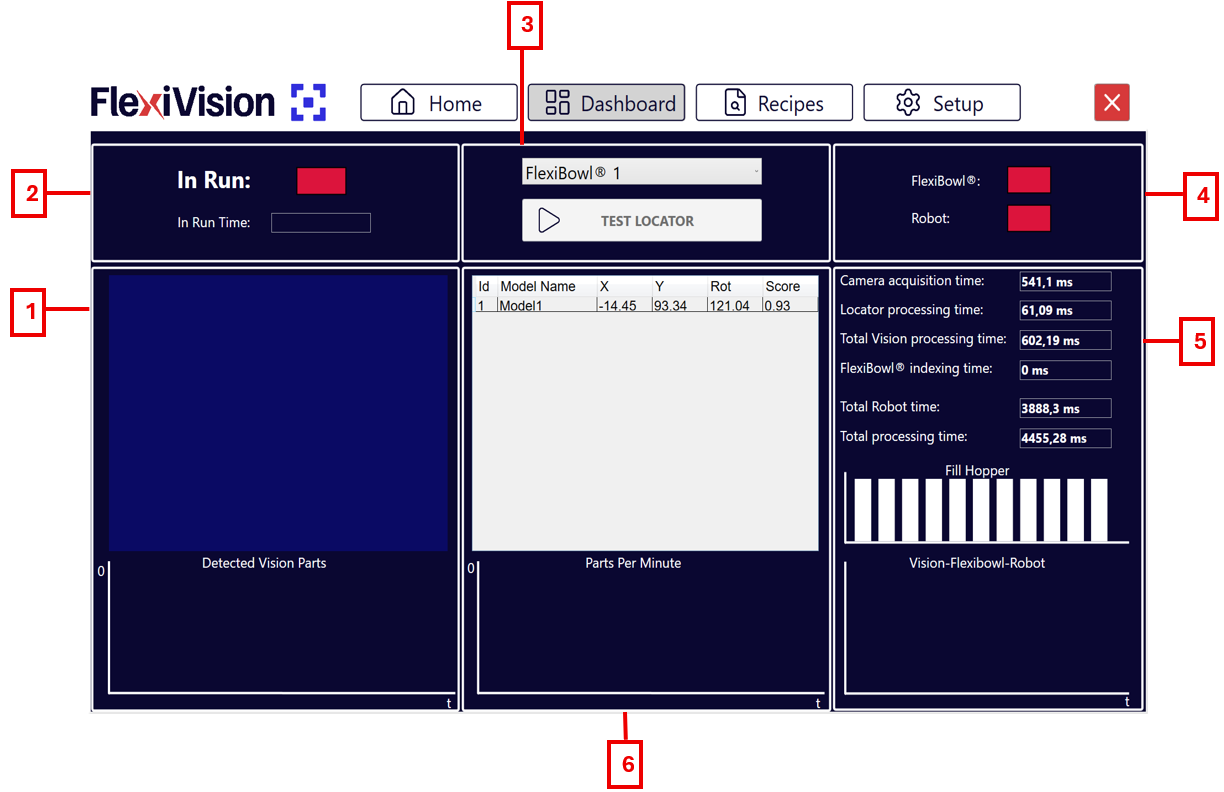
../../_images/pagina_dashboardW.png ../../_images/pagina_dashboardB.png
Dashboard Page Description#

#

Description

1

Vision and detection area

  • Detected vision parts with chart: shows how many components were detected in the current image and the trend over time (30 s).

2

Operating status

  • In run: status indicator showing whether the system is running or stopped.

  • In run time: timer showing the total system operating time.

3

Controls and selection

  • FlexiBowl dropdown menu: allows selection of the FlexiBowl® device to operate.

  • Test Locator: starts cyclic FlexiBowl and hopper movements while components are present in the viewing area.

4

Connection status

  • FlexiBowl: shows the real-time connection status of the FlexiBowl.

  • Robot: shows the real-time connection status of the robot.

5

Cycle time analysis

  • Camera/Locator processing time: single image acquisition and component recognition times.

  • Total vision processing Time: sum of camera and locator processing times.

  • Total FlexiBowl / Robot time: time for one FlexiBowl movement sequence and one robot pick-and-place cycle.

  • Total processing time: total process time, vision plus FlexiBowl plus robot.

  • Fill hopper: history of hopper discharges onto the FlexiBowl plate.

  • Vision - FlexiBowl - Robot: comparative chart of the three functions to understand the impact of each process on total cycle time.

6

Performance charts and history

  • Detected model list: table with component coordinates (X, Y), rotation (Rot), and Score showing how similar the recognized object is to the reference model.

  • Parts per minute: chart showing the average number of picked parts per minute.

Recipes page#

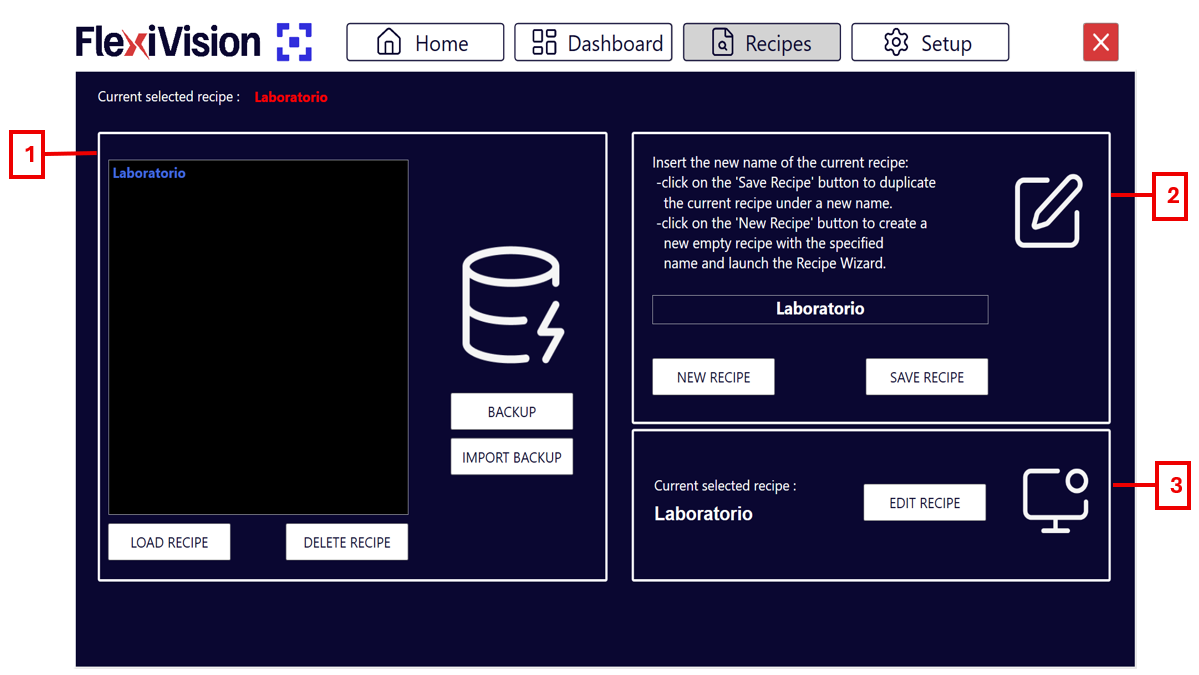
../../_images/pagina_recipesW.png ../../_images/pagina_recipesB.png
Recipes Page Description#

#

Description

1

Recipe database management

  • Backup: creates a backup of all recipes in a single .xml file that can be saved to the desired location.

  • Import backup: imports any backup previously created with FlexiVision One.

  • Load recipe: loads the selected recipe from the list above and makes it active.

  • Delete recipe: permanently deletes the selected recipe from the list.

2

Creation and saving

  • New recipe: starts the creation of a new recipe. After choosing the name and the FlexiBowl in use, the model creation menu opens directly.

    Note

    The recipe must then be saved by clicking Save.

  • Save recipe: saves the current recipe by overwriting the modified parameters, or creates a new file if it does not yet exist.

3

Recipe editing

  • Edit recipe: direct button that opens the configuration and model creation menu for the currently selected recipe.

Setup page#

../../_images/pagina_setupW.png ../../_images/pagina_setupB.png
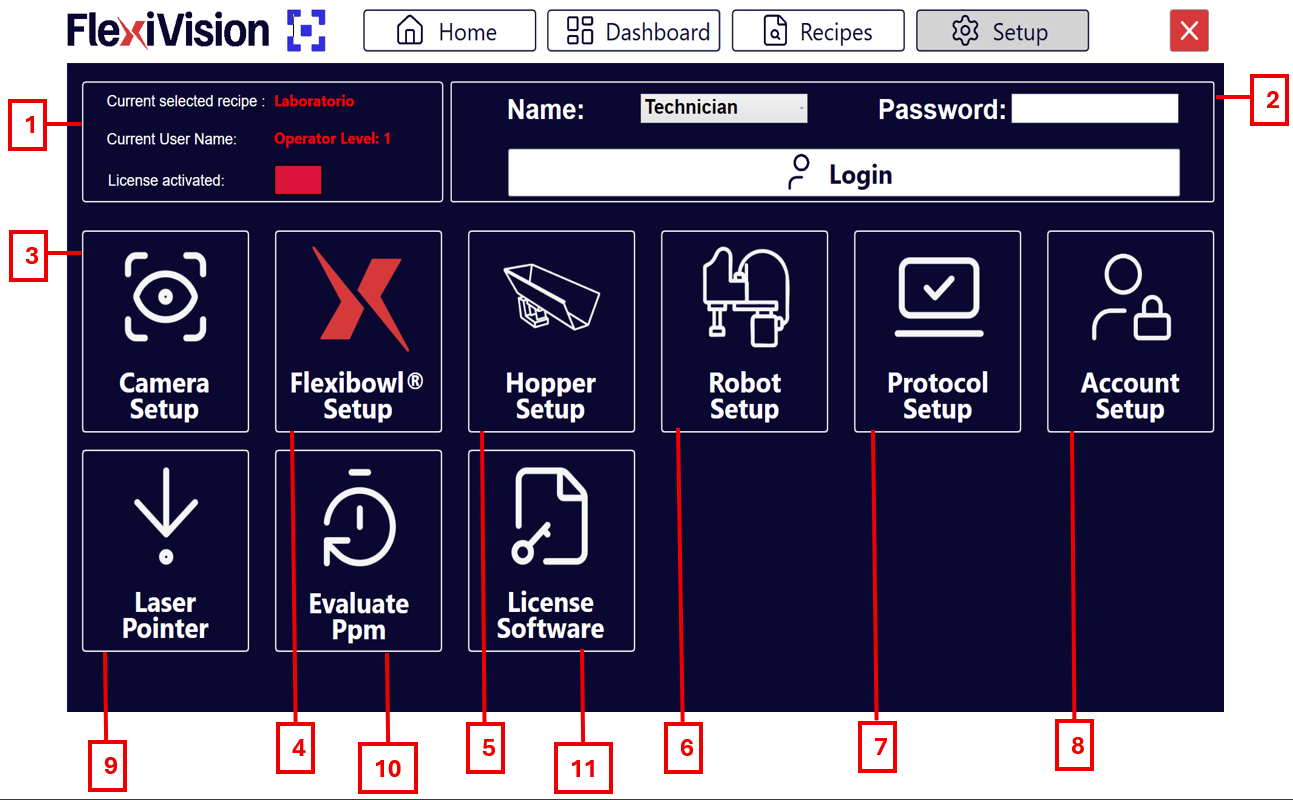
Setup Page Description#

#

Description

1

Status information

  • Current selected recipe: indicates the name of the recipe currently in use.

  • Current user name: shows the logged-in user and the related access level.

  • In Run: indicates whether the application is active.

2

Access panel

  • Name: field for entering the user name.

  • Login: button used to confirm credentials and access the system.

3

Camera setup: section dedicated to camera parameter configuration.

4

FlexiBowl setup: area for setting FlexiBowl movement and control parameters.

5

Hopper setup: configuration of hopper parameters such as vibration and discharge.

6

Robot setup: section for configuring robot communication.

7

Protocol setup: page for configuring the parameters that define how many objects the vision system must or can return in each cycle, in what order they are prioritized, and which statistical values are used depending on the number of robot picks and the maximum management time for each component.

8

Account setup: allows configuration of the various user accounts according to access levels.

9

Laser pointer: allows use of a laser tool to simulate a pick when the robot is not available.

10

Evaluate PPM: allows estimation of parts per minute, or PPM, when the laser pointer is used.

11

Licence software: page for software license activation.

INFO buttons#

In each operating section, an INFO button is available at the top right. Inside this button, the same step-by-step procedure explained in the video tutorial is available.

Info button for the Camera FLB page
Info button for the Calibration page
Info button for the Train Model page
Info button for the Define Robot Picking Area page
Info button for the Locator Model page
Info button for the Clearances page
Info button for the Clearance 1 page
Info button for the Picking Offset page
Info button for the Define Hopper Area page
Info button for the Define Hopper Value page