

Setup Page#
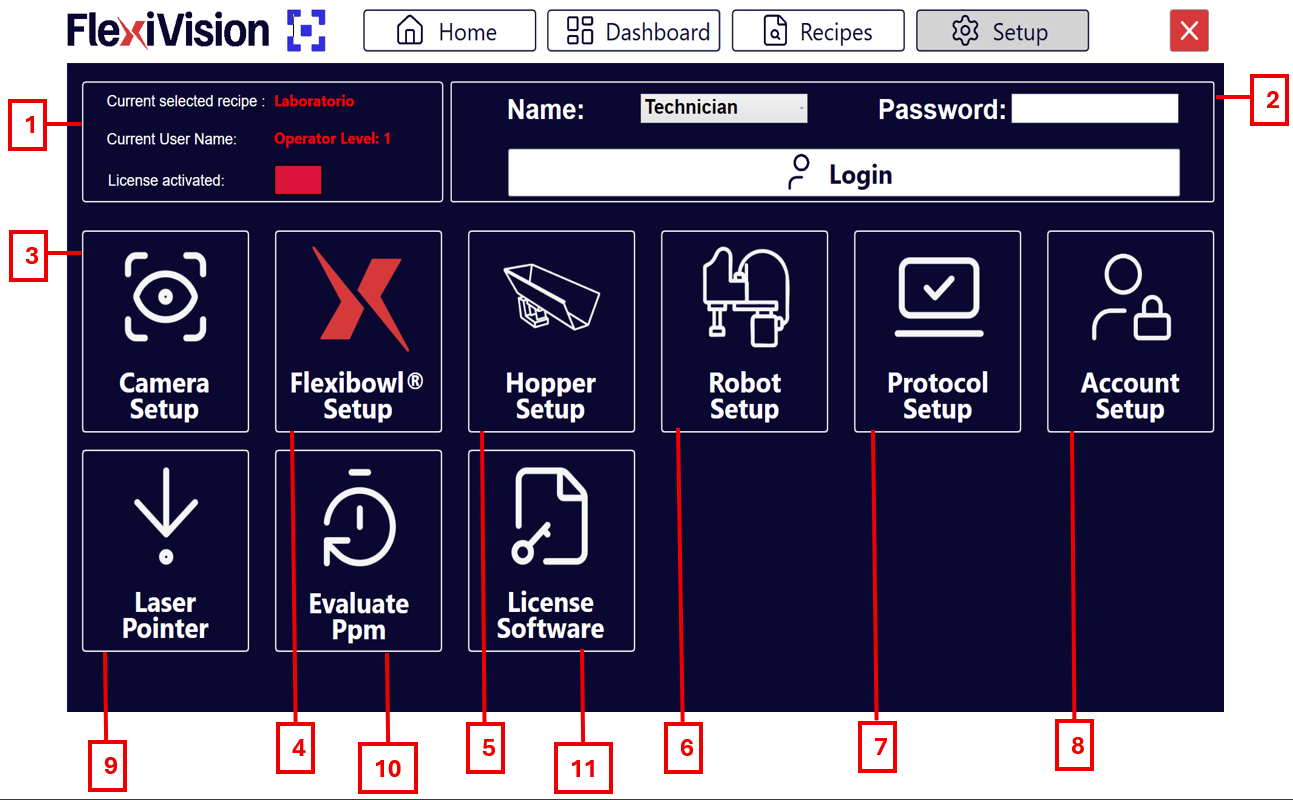
The FlexiVision One interface is organised in functional sections that guide the user from initial configuration to operational management of the system. Each page provides real-time information on machine status, connections, performance and process parameters, with direct access to the main functions. Navigation is designed to be easy to use, having immediate control over operations and continuous monitoring of vision, feeding and robot performance.
# |
Description |
|---|---|
1 |
Status Information
|
2 |
Access Panel
|
3 |
Camera setup: section dedicated to the configuration of camera parameters. |
4 |
FlexiBowl® setup: area for setting the movement and control parameters of the FlexiBowl®. |
5 |
Hopper setup: configuration of hopper parameters (vibration and discharge). |
6 |
Robot setup: section for configuring robot communication. |
7 |
Protocol setup: parameter configuration page defining how many objects the vision must or can return in each cycle, in what order they are prioritised and which statistical values to use based on the number of robot picks and the maximum time to manage each component. |
8 |
Account setup: allows the various user accounts to be configured according to login levels. |
9 |
Laser pointer: allows a laser tool to be used to simulate a pick in the absence of the robot. |
10 |
Evaluate PPM: allows you to estimate parts per minute (PPM) when using the laser pointer. |
11 |
Licence software: page for activating software licence. |