

Dashboard Page

Dashboard Page#

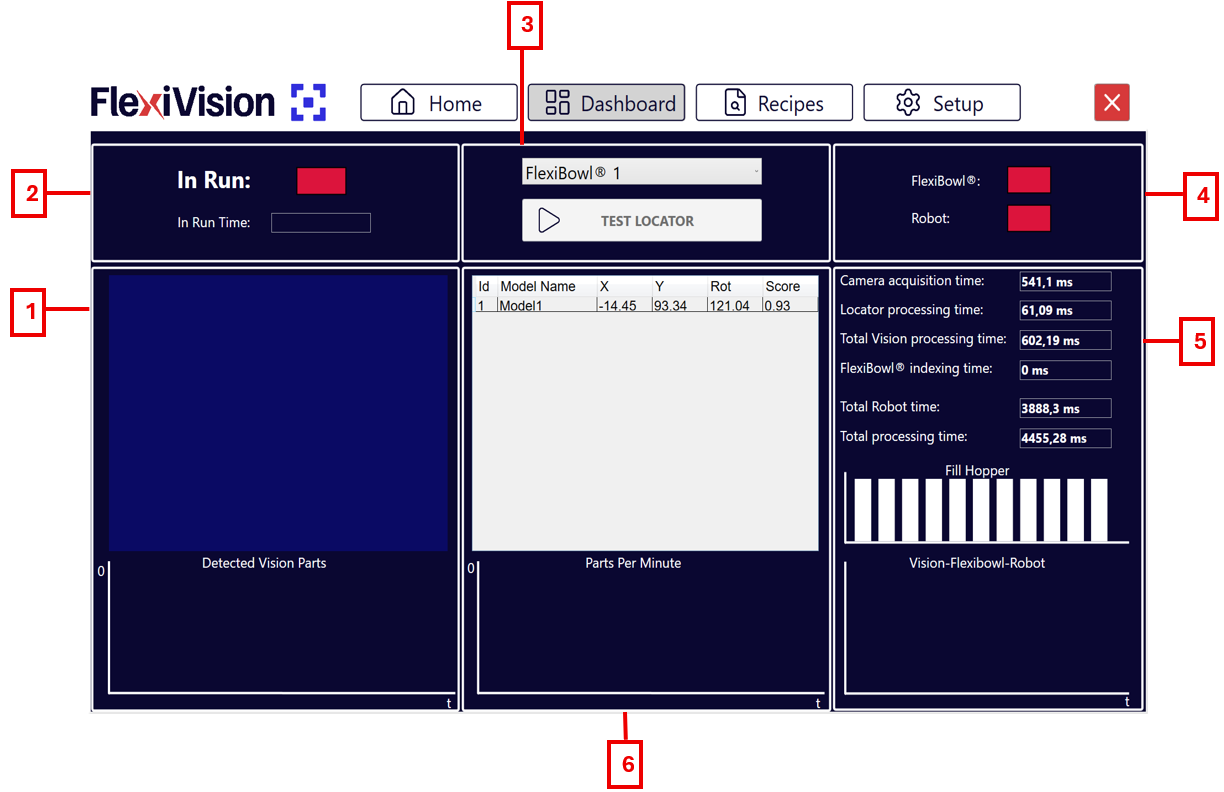
The FlexiVision One interface is organised in functional sections that guide the user from initial configuration to operational management of the system. Each page provides real-time information on machine status, connections, performance and process parameters, with direct access to the main functions. Navigation is designed to be easy to use, having immediate control over operations and continuous monitoring of vision, feeding and robot performance.
../../_images/pagina_dashboardW.png ../../_images/pagina_dashboardB.png
Dashboard Page Description#

#

Description

1

Vision and Detection Area

  • Detected vision parts with graph: how many components were detected in the current image and the trend over time (30s).

2

Operating Status

  • In run: indicator light showing whether the system is running or stopped.

  • In run time: chronometer indicating total system uptime.

3

Controls and Selection

  • FlexiBowl® drop-down menu: allows you to select the FlexiBowl® device you wish to operate on.

  • Test Locator: starts cyclic movements of FlexiBowl® and hopper as long as there are components in the vision area.

4

Connection Status

  • FlexiBowl®: indicates the status of the real-time connection with the FlexiBowl®.

  • Robot: indicates the status of the real-time connection with the robot.

5

Timings Analysis

  • Camera/Locator processing time: individual image shot and component identification timing.

  • Total vision processing Time: sum of camera and locator times.

  • Total FlexiBowl® / Robot time: time for a FB movement sequence and a single robot pick & place.

  • Total processing time: total process time (Vision + FB + Robot).

  • Fill hopper: log of discharges from the hopper onto the FlexiBowl® disc.

  • Vision - FlexiBowl® - Robot: comparative graph of the three functions to understand the impact of each individual process on the total time.

6

Performance Graphs and Log

  • List of detected models: table with coordinates (X, Y), rotation (Rot) of the component and the Score (degree of similarity of the identified object compared to the reference model).

  • Parts per minute: graph of average parts picked per minute.