

FlexiVision One Manual#
Welcome to the FlexiVision One manual!#
We are excited to welcome you to your new FlexiVision One guide! This manual has been specifically drafted to be your clear and reliable reference. We hope that, by consulting it, you will fully enjoy all the benefits of our system. Your opinion is crucial to us: please do not hesitate to give us your feedback by contacting us!
- The ARS Automation Team


What is FlexiVision One?#
FlexiVision One is our vision solution based on VisionController, designed to guide the robot and available as an add-on for FlexiBowl® systems. Retaining all the full-capacity functions of the previous version, thus allowing unloading, separation, identification and picking of bulk parts on the feeder surface, FlexiVision One revolutionises the user’s experience. With comprehensive step-by-step guidance and intuitive tools, we have greatly simplified the process, making programming and operation accessible and usable by anyone, regardless of their level of expertise.
System overview#
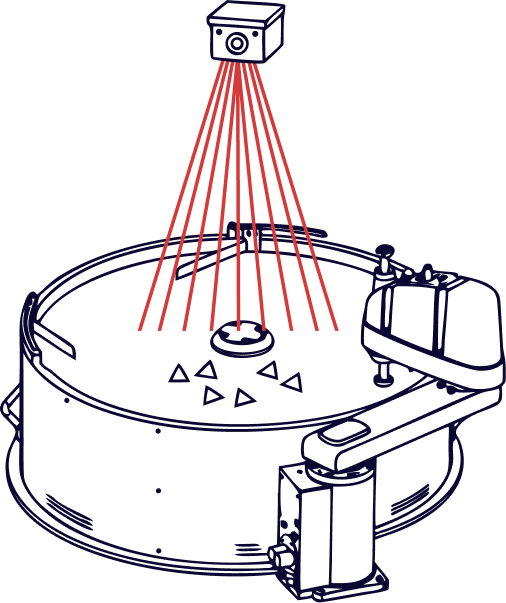
Example diagram of the FlexiVision One system#
How to read the manual#
This manual is intended to support both the system design and integration phase, as well as the on-field installation and commissioning phase. For this reason, it is divided into macro-sections with distinct addressees and purposes.
Which section are you looking for?#
If you must… |
The information can be found in… |
|---|---|
Check dimensions, weights, electrical requirements and communication protocols |
|
Install the components, wire the system, configure the network or calibrate the camera/robot |
|
Program a new part model or configure the feed system |
|
Solve problems or request assistance |
Intervention groups and responsibilities#
The successful implementation of FlexiVision One requires the collaboration of several professionals. This table establishes roles and responsibilities:
Professional figure |
Main responsibilities |
Sections of the reference manual |
|---|---|---|
System Integrator |
Layout design, component dimensioning, assessment of technical requirements |
Technical reference and specifications, Options |
Installation technician |
Mechanical assembly, electrical wiring, network configuration |
System installation, wiring and connections |
Robot programmer |
Camera-robot calibration, plugin integration, pick logic programming |
Quickstart, Protocol Setup, Calibration |
Line operator |
Creating new part models, configuring FlexiBowl® parameters, monitoring performance |
Checking Run Time results |
Maintenance technician |
Troubleshooting, component replacement, software upgrades |
New model, FlexiBowl® configuration, Troubleshooting, Support |
Conventions and symbols used#
Throughout the manual, information banners are used to highlight important content:
Type |
Meaning |
|---|---|
Warning Warning |
Indicates a potentially hazardous situation or critical procedure which, if not carried out correctly, could result in damage to the equipment or serious system malfunctioning. |
Important Important |
Highlights vital information that must not be ignored to ensure the correct functioning of the system or the safety of the operation. |
Note Information note |
Provides essential information to correctly carry out the procedure, technical clarifications or references to related chapters. |
Tip Tip |
Suggests a best practice, alternative or advice that can simplify installation or improve system performance. |
Error Error |
Indicates a critical error or faulty condition requiring immediate action. It signals situations that jeopardise system operation and require corrective action. |