

Home Page

Home Page#

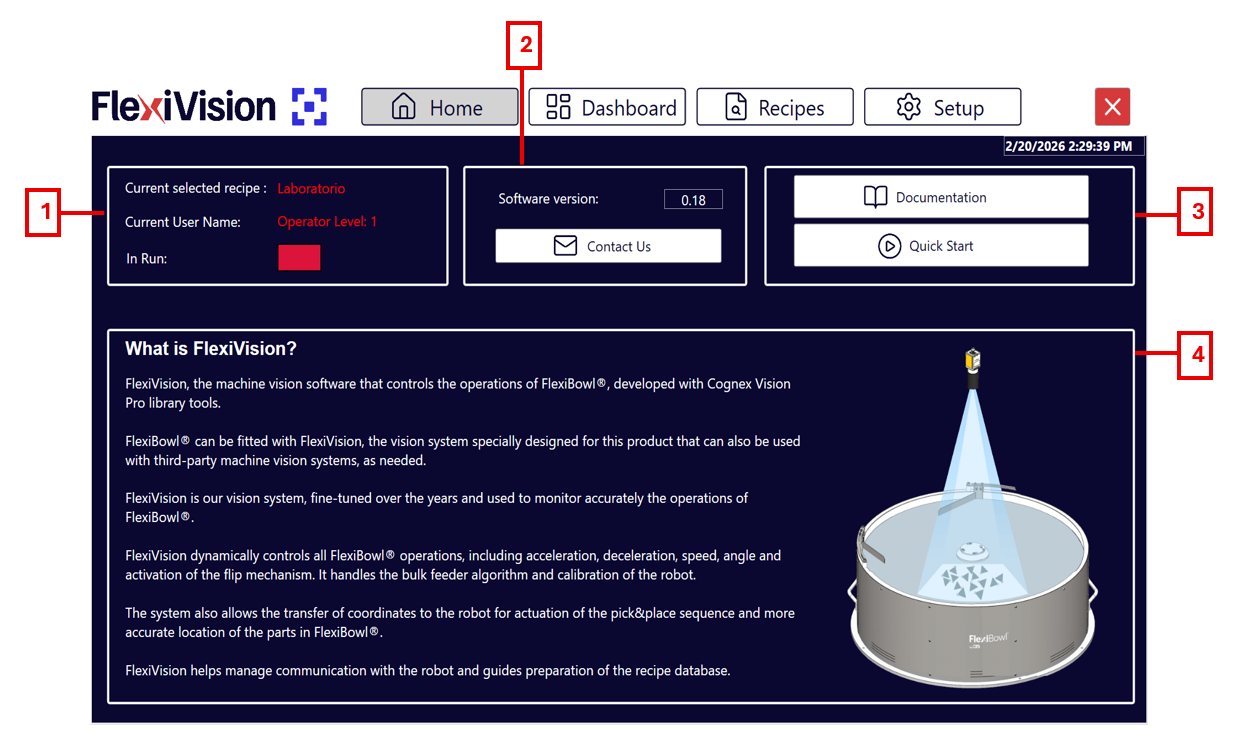
The FlexiVision One interface is organised in functional sections that guide the user from initial configuration to operational management of the system. Each page provides real-time information on machine status, connections, performance and process parameters, with direct access to the main functions. Navigation is designed to be easy to use, having immediate control over operations and continuous monitoring of vision, feeding and robot performance.
../../_images/pagina_homeW.png ../../_images/pagina_homeB.png
Home Page Description#

#

Description

1

Status and User Information:

  • Current selected recipe: displays the name of the currently uploaded and ready-to-use recipe.

  • Current user name: shows the name of the logged-in user and their login access to the system.

  • In run: indicates the operational status; it lets you know whether the system is currently running or stopped.

2

Software and Service Information:

  • Version software: indicates the currently installed FlexiVision One software version.

  • Contact us: button providing quick access to contact information for technical support and service.

3

Resources and Quick Guides:

  • Documentation: button to retrieve the complete library of technical documentation and manuals.

  • QuickStart: wizard section for fast and intuitive system set-up.

4

General Information Section:

  • What is FlexiVision One?: descriptive area providing an overview of the system’s main functions and how it integrates with the FlexiBowl® device.